A Mac menu bar app that tells you how much you have left — of your session, your week, and your credits — before “limit reached” kills your flow.
Download free for MacmacOS 14+ · Apple Silicon & Intel · Notarized by Apple · 1.1 MB
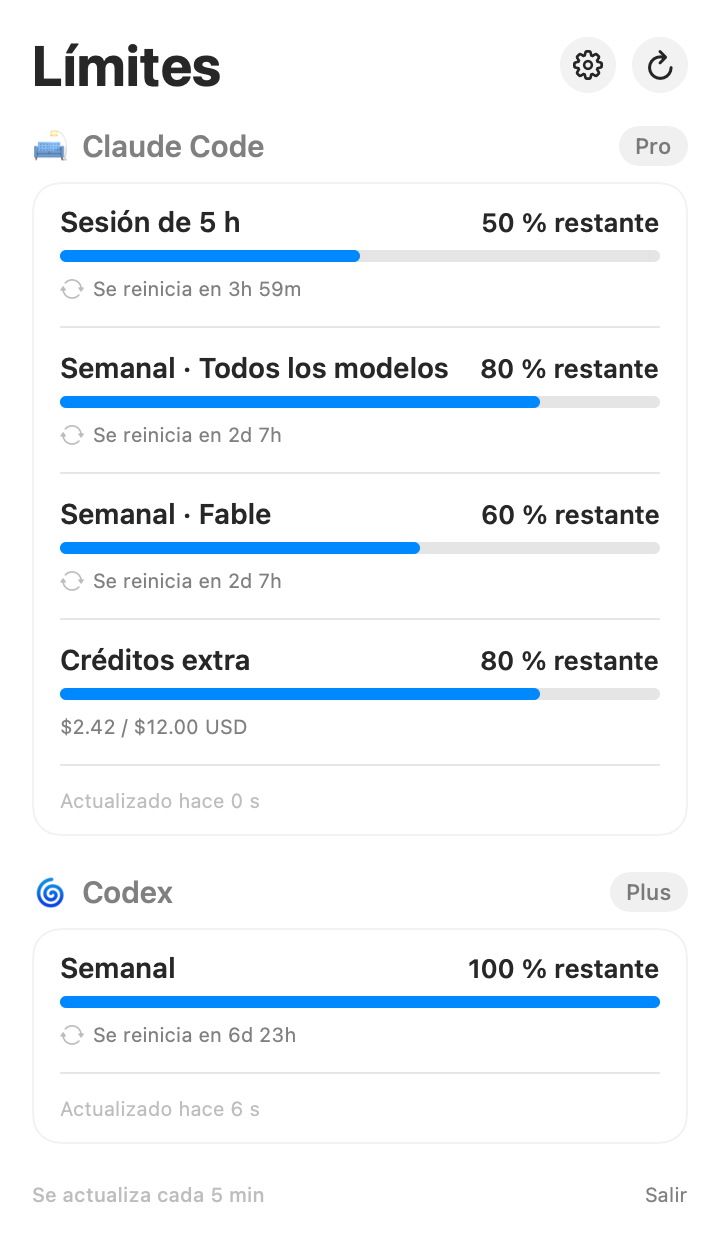
You're on a roll with Claude Code or Codex and suddenly: “you've reached your limit.” No warning, no idea how much you had used, no clue how long until it resets.
Your 5-hour session, weekly limits (all models and per-model, like Fable) and your extra credits — with progress bars and countdowns.
The two services you use to code with AI, in one single panel. Show or hide each one.
No account to create, no API keys. It detects the sessions you're already signed in to in your CLIs and works instantly.
Your credentials never leave your Mac. The app only queries Anthropic's and OpenAI's official usage endpoints. No analytics, no middleman servers.
Choose what the menu bar shows, how often it refreshes, and whether it launches at login.
The app tells you when a new version is out. One click and you download the update.
Download and open the app.
The gauge appears in your menu bar.
Click it and see your limits in real time.
Requires being signed in to Claude Code and/or Codex CLI.
Yes. The binary is universal: it runs natively on Apple Silicon (M1 and later) and on Intel Macs. Requires macOS 14 Sonoma or later.
Yes, completely free.
No. The app uses the sessions you're already signed in to in Claude Code (claude) and/or Codex (codex). If you don't use those CLIs, the app has nothing to show you.
Everything happens on your Mac. The app reads your CLIs' local credentials and queries only Anthropic's and OpenAI's official usage endpoints. No analytics, no tracking, no developer servers in between.
Yes: it's signed with a Developer ID and notarized by Apple, which means Apple scanned the binary. It opens with a normal double-click.
The app itself lets you know when a new version is available and takes you to the download. You can also check for updates manually in Settings.
No. It's an independent tool made by a solo developer; Claude and Codex are trademarks of their respective companies.
macOS 14+ · Apple Silicon & Intel · Notarized by Apple · 1.1 MB
 MonitorConsumo